









PrintTransformer
PrintTransformer adds dynamic formatting to MarkMagic. Define conditional behavior at the field level. Text, Bar Code, Line, Box, Graphic, Text Block and even RFID field attributes can print conditionally based on variable data or job attributes.

Take Control of Your Document Management
The MarkMagic PrintTransformer add-on lets you take control of your document management with minimum effort. At print time, PrintTransformer automatically processes rules and conditions, changes printing instructions, bursts print files to print each page or record with its own set of instructions and changes field attributes based on field data.
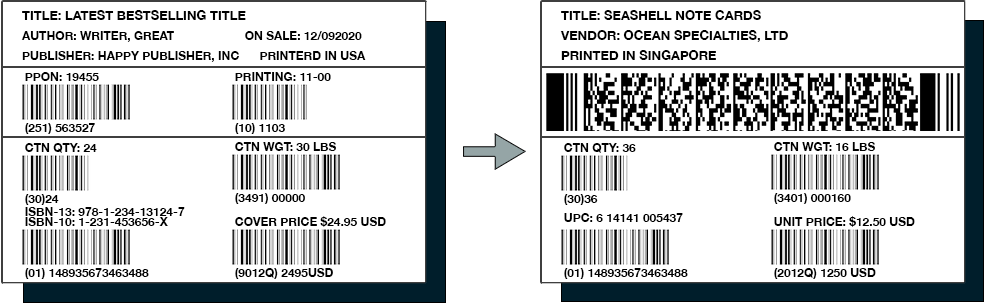
Change barcodes and make text fields disappear from one label to the next,
[eBOOK]
5 Key Features Your Barcode Labeling Software is Missing
Get vital insights into evaluating your current barcode labeling system, and also discover barcoding features and capabilities you may not be aware of.
Transform Your Printing & Labeling Workflow with Ease
Stop outsourcing design changes or pulling a programmer off another project. Users who normally request changes (or new formats) can now easily make them on their own. Save time and money by adding conditions to automatically format these changes. All with absolutely no programming.
All Your Data Can Do
Say goodbye to static, one-size-fits-all labels and forms. PrintTransformer lets you automate, customize, and enhance label printing without modifying your ERP, WMS, or application code.
- Change Logo
- Move Customer ID Text Field
- Add Customer ID Barcode
- Suppress shading in all Box Fields
- Change Invoice Header Style
- Move Invoice Date
- Add Invoice Number Barcode
- Add Customer Message
- Change font from Courier to CG Omega
- Add product specific Text Block
- Add product specific images & drawings
- Move Boxes, Lines, and Text Fields from across bottom lower right of invoice.
Features and Capabilities
Forget complicated coding or customizations—PrintTransformer gives you total control over your forms, labels, and print jobs. With a few simple rules, you can dynamically adjust your prints page by page, unlocking powerful customization without IT involvement.

Change Barcode Types and Character Sets
Switch barcode types based on carrier or customer. Adjust character sets for country-specific labels with the right currency and formatting—automatically.

Combine Rules and Conditions
Rules and conditions can be easily combined and multiple rules and conditions can be created to select printer, change multiple field attributes, or modify other instructions all in the same print job.

Add Variable Graphics
Dynamic logos and other graphics can be displayed or suppressed based on company, customer, or SKU. Perfect for generating documents for multiple entities. Change field color based on data in any field in real time.

Dynamic Information and Printing
Automatically update fields based on document data—print reminders for outstanding balances, holiday messages on set dates, or different formats for each page. Display headers on page one, with details on the rest.

Switch Printers Automatically
Know which carrier is pulling up to your dock? PrintTransformer can automatically send compliance labels to the right printer—whether it’s a thermal label printer in one warehouse or a high-speed inkjet in another.

Simplify Your Format Library
Meet every requirement with fewer formats. PrintTransformer allows you to reduce your total number of MarkMagic formats you need to maintain and increase satisfied requirements.
Request a Demo
There is no limit to the ways PrintTransformer can simplify your document management, saving time and money. An incredible value, PrintTransformer gives you conditional printing for a fraction of what the competition charges for their forms solutions.
How users can benefit from PrintTransformer:
- Automate form and label customization—no coding required
- Change barcode types based on carrier or customer
- Adjust character sets for country-specific labels
- Apply multiple rules in a single print job
- Show or hide logos and change field colors dynamically
Request a demo to see how PrintTransformer can improve your printing operations.